

Real-Time Designer enables you to assign a business entity to the source URL of an IFRAME so that when the value of the business entity changes, the content within the IFRAME changes too.
To assign a business entity value to the source URL of an IFRAME:
| 1. | In the callout, select the IFRAME within the callout. |
| 2. | Select the Assignment  tool in the Links & Data area of the callout toolbar. tool in the Links & Data area of the callout toolbar. |
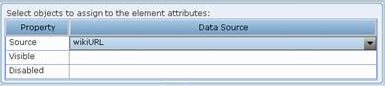
| 3. | In the Source field, specify the URL for the business entity to be displayed in the IFRAME. |
All other properties in this window are optional.
