

Desktop-to-Citrix Support for Application Usage Events Monitoring Configuration
The following System Settings window shows a sample configuration for the master client, where the local desktop client is defined as the master client.
A master client (desktop or Citrix) can only receive an Desktop Analytics feed from a Citrix channel that is directly connected.
If more than one Citrix session is in use, the master client must be running on the local desktop.
Processes cannot run from the slave machine.
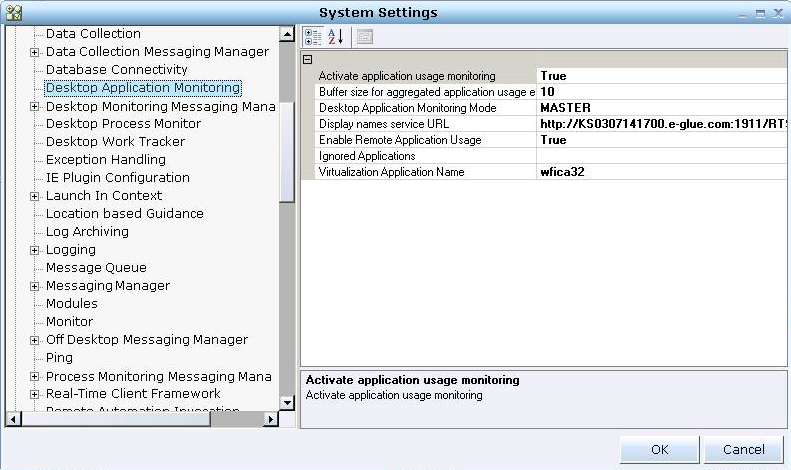
The following table shows an example of how to properly configure this feature. In this example, the desktop client is the master client. When the Citrix client is the master client, modify the configuration accordingly.
|
Configuration Parameter Description |
Configuration Parameter |
Value for Desktop Client |
Value for Citrix Client |
Comments |
|
Sets the client monitoring mode |
Desktop Application Monitoring Mode |
Master |
Slave |
|
|
Sets the use of the feature |
Enable Remote Application Usage |
True |
True |
The default is False. |
|
The Citrix sessions' process names that are to be ignored, separated by a comma, provided by the customer's IT. |
Virtualization Application Name |
For example, "wfica32,CDViewer" |
NA |
The default value is "". |
|
review: Is this still RTAM? For the following parameters, you will need to scroll down in the Settings window until you reach RTAM Channel Enumerator. Click the + sign to open and then click RTAM C2C Channels > rtamc2cchannel:
|
||||
|
Type of client |
Type |
CitrixLocal |
CitrixServer |
Per Citrix channel. |
|
Citrix channel name |
Channel Name |
"" |
"" |
The value must be identical for both the master client and Citrix client. |

