

In attended automation environments, users sometimes run many instances of the application. When this is the case, it is not clear to which instance of the application the APA connector needs to connect.
The multi-instances functionality enables the Real-Time Client connectivity framework to connect to a specific instance of a given application, based on the characteristics of the instance.
To enable working with multiple instances:
| 1. | In the Identification tab, select Has multi instances. |
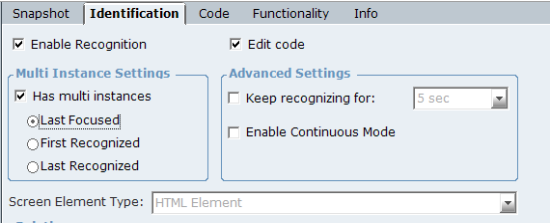
| 2. | Select one of the following: |
Last Focused: The last active instance. For example, the last focused instance in Internet Explorer browser refers to the last active window (or active tab in the same browser’s window) with the same website. In this case the Real-Time Client retrieves values from this instance. When you click another window (tab) with the same website, the Real-Time Client handles the values from the window (tab) you have just opened, which is the window that is in focus.
First Recognized: Stays connected to the first instance that was opened even if subsequent instances are opened, regardless of the current active instance.
Last Recognized: Connects to a new instance that is opened, and ignores the ones that were opened previously, regardless of the current active instance.
You can change the default state of the Has multi instances checkbox. In the Multi Instance Classes Names parameter in the System Settings window, you can define the classes names for which Has multi instance is checked by default once you capture an HTML object of the specified classes. For more information, see the IE Plugin Configuration section in the Advanced Process Automation System Administration Guide.
